MusicXML music data contains two main types of elements. One set of elements is used primarily to represent how a piece of music should sound. These are the elements that are used when creating a MIDI file from MusicXML. The other set is used primarily to represent how a piece of music should look. These elements are used when creating a Finale file from MusicXML.
We encourage programs writing MusicXML to write as much accurate data as they can. The only elements that are required, though, are the sounding elements that relate directly to writing a MIDI file from MusicXML. This is where we will start in introducing the musical elements of a MusicXML file.
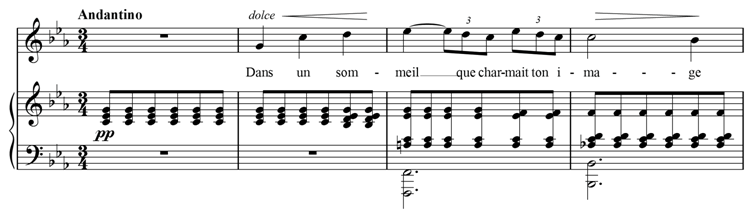
As an example, we will use the first four bars of "Après un rêve" by Gabriel Fauré:
The attributes element contains information about time signatures, key signatures, transpositions, clefs, and other musical data that is usually specified at the beginning of a piece or at the start of a measure. We discuss the MIDI-compatible elements here; the rest are discussed in the following sections.
In this example, our Finale translator produces the following MIDI-compatible attributes:
  <attributes>
    <divisions>24</divisions>
      <key>
        <fifths>-3</fifths>
        <mode>minor</mode>
      </key>
    <time>
      <beats>3</beats>
      <beat-type>4</beat-type>
    </time>
  </attributes>
Musical durations are commonly referred to as fractions: whole notes, half notes, quarter notes, and the like. While each musical note could have a fraction associated with it, MusicXML instead follows MIDI by specifying the number of divisions per quarter note at the start of a musical part, and then specifying note durations in terms of these divisions.
MusicXML allows divisions to change in the middle of a part, but most software will probably find it easiest to compute one divisions value per part and put that at the beginning of the first measure. The divisions value of 24 in this example allows for both triplet eighth notes (duration of 8) and regular sixteenth notes (duration of 6).
Standard key signatures are represented very much like MIDI key signatures. The fifths element specifies the number of flats or sharps in the key signature - negative for flats, positive for sharps. The fifths name indicates that this value represents the key signature's position on the circle of fifths. MusicXML uses the mode element to indicate major or minor key signatures.
Standard time signatures are represented more simply in MusicXML than in MIDI. The beats element represents the time signature numerator, and the beat-type element represents the time signature denominator (vs. a log denominator in MIDI).
If you are writing a part for a transposing instrument, the transposition must be specified in MusicXML in order for the sound output to be correct. The transpose element represents what must be added to the written pitch to get the correct sounding pitch.
The chromatic element, representing the number of chromatic steps to add to the written pitch, is the one required element. The diatonic, octave-change, and double elements are optional elements.
Say we have a part written for a trumpet in B-flat. A written "C" on this part will sound as a B-flat on a piano. This transposition is one diatonic step down (C to B) and two chromatic half steps down (C to B to B-flat). In MusicXML it would be represented as:
    <transpose>
      <diatonic>-1</diatonic>
      <chromatic>-2</chromatic>
    </transpose>
The diatonic element is not needed for correct MIDI output, but it helps get transposition notation correct and programs are encouraged to use it wherever possible.
The octave-change element is used when transpositions exceed an octave in either direction. The double element is used when the part should be doubled an octave lower, as when a single part is used for both cello and string bass.
Pitch, duration, ties, and lyrics are all represented within the MusicXML note element. For example, the E-flat that starts bar 3 in the voice part has the following MIDI-compatible elements:
  <note>
    <pitch>
      <step>E</step>
      <alter>-1</alter>
      <octave>5</octave>
    </pitch>
    <duration>24</duration>
    <tie type="start"/>
    <lyric>
      <syllabic>end</syllabic>
      <text>meil</text>
      <extend/>
    </lyric>
  </note>
In MIDI, a pitch is represented by a single number. MusicXML divides pitch up into three parts: the step element (A, B, C, D, E, F, or G), an optional alter element (-1 for flat, 1 for sharp), and an octave element (4 for the octave starting with middle C).
The pitch represents the sound, not what is notated, so an alter element must be included even if it represents a flat or sharp that is part of the key signature. This is why the E-flat contains an alter element, though there is no accidental on the note.
Alter values of -2 and 2 can be used for double-flat and double-sharp. Decimal values can be used for microtones (e.g., 0.5 for a quarter-tone sharp), but not all programs may convert this into MIDI pitch-bend data.
For rests, a rest element is used instead of the pitch element. The whole rest in 3/4 that begins the voice part is represented as:
  <note>
    <rest/>
    <duration>72</duration>
  </note>
The duration element is an integer that represents a note's duration in terms of divisions per quarter note. Since our example has 24 divisions per quarter note, a quarter note has a duration of 24. The eighth-note triplets have a duration of 8, while the eighth notes have a duration of 12.
The sounding part of a tied note is indicated by the tie element. The tie element has a type of start for the starting note of a tie, and a type of stop for the ending note in a tie. A note element can have two tie elements. If a note is tied to the notes both before and after it, place the tie to the previous note, <tie type="stop">, before the <tie type="start"> to the next note.
The duration elements in MusicXML move a musical counter. To play chords, we need to indicate that a note should start at the same time as the previous note, rather than following the previous note. To do this in MusicXML, add a chord element to the note.
In our example, the piano part does not have rhythms more complex than eighth notes, so our converter sets the divisions value to 2. With 2 divisions per quarter note, the sound portion of the first chord in the piano part is represented as:
  <note>
    <pitch>
      <step>C</step>
      <octave>4</octave>
    </pitch>
    <duration>1</duration>
  </note>
  <note>
    <chord/>
    <pitch>
      <step>E</step>
      <alter>-1</alter>
      <octave>4</octave>
    </pitch>
    <duration>1</duration>
  </note>
  <note>
    <chord/>
    <pitch>
      <step>G</step>
      <octave>4</octave>
    </pitch>
    <duration>1</duration>
  </note>
Each note in the chord following the first one includes a chord element before the pitch element.
If you find that you have notes in a chord with different durations, you are probably better representing this as multi-part music rather than a chord. If you must have notes with different durations in the chord, the longest note must be the first note in the chord.
While lyrics are not yet used in sound generation, they are included in Standard MIDI files, so we will discuss them here with the other MIDI-compatible features of MusicXML.
Lyrics in MusicXML use an optional syllabic element to indicate how a syllable fits into a word, rather than having conventions based on hyphens and spaces as some other formats do. The values for syllabic can be "single", "begin", "end", or "middle". We saw earlier that the E-flat starting the third measure had a syllabic value of "end", since "meil" was the end of a two-syllable word. The "ma" syllable in "image" has a syllabic value of "middle". In the second measure, the notes are:
  <note>
    <pitch>
      <step>G</step>
      <octave>4</octave>
    </pitch>
    <duration>24</duration>
    <lyric>
      <syllabic>single</syllabic>
      <text>Dans</text>
    </lyric>
  </note>
  <note>
    <pitch>
      <step>C</step>
      <octave>5</octave>
    </pitch>
    <duration>24</duration>
    <lyric>
      <syllabic>single</syllabic>
      <text>un</text>
    </lyric>
  </note>
  <note>
    <pitch>
      <step>D</step>
      <octave>5</octave>
    </pitch>
    <duration>24</duration>
    <lyric>
      <syllabic>begin</syllabic>
      <text>som</text>
    </lyric>
  </note>
The actual text of the lyric is specified in the text element. A note may have multiple syllables, in which case the multiple syllabic/text element pairs should be separated by an elision element. Word extensions may be indicated by using the extend element, as in the “meil” syllable above.
Multiple verses are indicating using multiple lyric elements. The number and name attributes can be used to distinguish them: <lyric number="1"> for the first verse, <lyric number="2"> for the second.
MusicXML has end-line and end-paragraph elements to support Standard MIDI File Lyric meta-events specified in RP-017. These are used for karaoke and similar applications. Elements for humming and laughing may also be included, though they do not have MIDI equivalents. These lyric elements have not yet been implemented in MusicXML software.
While monophonic instruments like trumpet, flute, and voice move along one note at a time, instruments like the piano can have many musical lines at once. Take this simple example from the first bar of Frederic Chopin's Prelude, Op. 28, No. 20:
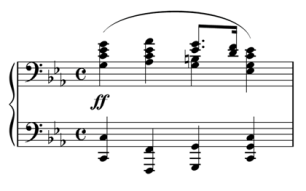
Within the piano part, there are two musical lines for the left hand and right hand, represented in the two staves. On the third beat of the bar, the right hand divides into two lines as well.
We mentioned earlier that the duration element in a note moves the MusicXML musical counter, and that a chord element keeps this counter from moving further. In order to represent parallel musical parts, we need to be able to move the musical counter forwards and backwards independently of notes. This is what the forward and backup elements let us do.
Let's say we have 4 divisions per quarter in this example. We could approach the divided parts in the right hand in two ways. Finale, for instance, can represent multiple parts using either the layer feature or the voice 1/voice 2 feature. When using layers, each independent part generally covers a complete measure. Say that the G and B-natural on beat 3 are in layer 2, with all the other notes in layer 1. After completing the last chord in layer 1, we would use the following to add the layer 2 notes:
  <backup>
    <duration>16</duration>
  </backup>
  <forward>
    <duration>8</duration>
  </forward>
  <note>
    <pitch>
      <step>G</step>
      <octave>3</octave>
    </pitch>
    <duration>4</duration>
  </note>
  <note>
    <chord/>
    <pitch>
      <step>B</step>
      <octave>3</octave>
    </pitch>
    <duration>4</duration>
  </note>
  <forward>
    <duration>4</duration>
  </forward>
The first backup element moves the counter back to the beginning of the measure. The forward element that follows serves as an invisible half rest. The two note elements provide the quarter note chord. The last forward element serves as an invisible quarter note rest to move the music counter up to the end of the measure.
On the other hand, we could use the voice 1/voice 2 feature on the third beat to indicate a temporary split in the parts. In this case, we would have something like:
  <note>
    <pitch>
      <step>G</step>
      <octave>3</octave>
    </pitch>
    <duration>4</duration>
  </note>
  <note>
    <chord/>
    <pitch>
      <step>B</step>
      <octave>3</octave>
    </pitch>
    <duration>4</duration>
  </note>
  <backup>
    <duration>4</duration>
  </backup>
  <note>
    <pitch>
      <step>E</step>
      <alter>-1</alter>
      <octave>4</octave>
    </pitch>
    <duration>3</duration>
  </note>
  <note>
    <chord/>
    <pitch>
      <step>G</step>
      <octave>4</octave>
    </pitch>
    <duration>3</duration>
  </note>
  <note>
    <pitch>
      <step>D</step>
      <octave>4</octave>
    </pitch>
    <duration>1</duration>
  </note>
  <note>
    <chord/>
    <pitch>
      <step>F</step>
      <octave>4</octave>
    </pitch>
    <duration>1</duration>
  </note>
Here, all that is needed is a backup command to go backup over the quarter note so that the dotted eighth and sixteenth are positioned properly.
MusicXML can handle either type of multi-part writing. In Finale, most users find it easier to use layers rather than voice 1/voice 2, so our Finale-based examples will use that idiom more often. But the choice of what to use is up to you, based on what fits your software best.
In both cases, we would then use a <backup> element with a duration of 16 to move from the end of the first staff to the beginning of the second staff, where we can continue with the left-hand line. MusicXML offers more features for multi-part and multi-staff writing that will be described in later sections, but the elements listed here are all that are needed for multi-part sound output.
Repeats and endings are represented by the <repeat> and <ending> elements with a <barline>, as defined in the barline.mod file.
In regular measures, there is no need to include the <barline> element. It is only needed to represent repeats, endings, and graphical styles such as double barlines.
A forward repeat mark is represented by a left barline at the beginning of the measure (following the attributes element, if there is one):
  <barline location="left">
    <bar-style>heavy-light</bar-style>
    <repeat direction="forward"/>
  </barline>
The repeat element is what is used for sound generation; the bar-style element only indicates graphic appearance.
Similarly, a backward repeat mark is represented by a right barline at the end of the measure:
  <barline location="right">
    <bar-style>light-heavy</bar-style>
    <repeat direction="backward"/>
  </barline>
While repeats can have forward or backward direction, endings can have three different type attributes: start, stop, and discontinue. The start value is used at the beginning of an ending, at the beginning of a measure. A typical first ending starts like this:
  <barline location="left">
    <ending type="start" number="1"/>
  </barline>
The stop value is used when the end of the ending is marked with a downward hook, as is typical for a first ending. It is usually used together with a backward repeat at the end of a measure:
  <barline location="right">
    <bar-style>light-heavy</bar-style>
    <ending type="stop" number="1"/>
    <repeat direction="backward"/>
  </barline>
The discontinue value is typically used for the last ending in a set, where there is no downward hook to mark the end of an ending:
  <barline location="right">
    <ending type="discontinue" number="2"/>
  </barline>
Musical scores abound with ambiguous notations for dynamics, tempo, and other musical elements. To automatically generate a MIDI or other sound file, some value must be used for dynamics or tempo. MusicXML defaults to a MIDI velocity of 90 (roughly a forte); no default tempo is specified.
Sound suggestion elements and attributes guide the creation of a sound file. Most of the sound suggestions are found in the sound element, defined in the direction.mod file. Tempo is specified in quarter notes per minute. Dynamics are specified as a percentage of the standard MusicXML forte velocity. For example, the following sound element specifies a tempo of quarter note = 88 with a MIDI velocity of 64:
<sound tempo="88" dynamics="71"/>
The other attributes for the sound element are described in the direction.mod file. Sound suggestions are also available for grace notes (the steal-time-previous, steal-time-following, and make-time attributes, defined in the note.mod file) and for ornaments (the trill-sound entity for trills and other ornaments, defined in the common.mod file).
|
MusicXML Documentation Home
|

|